How to Increase the Number of Leads on Your Company Website Without Rebuilding It

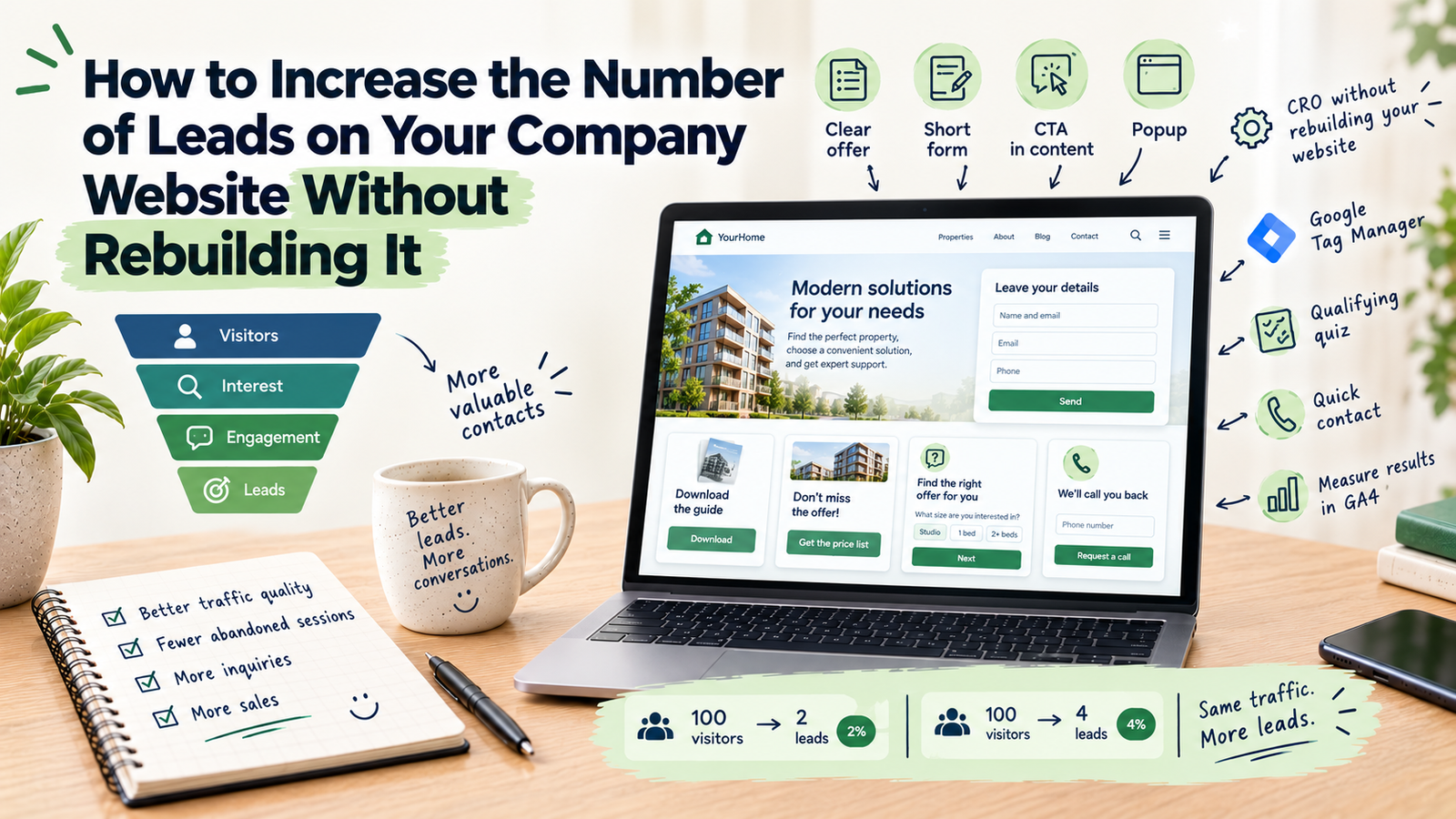
To increase the number of leads, you need to do three things: bring people interested in your offer to your website, remove obstacles on the way to the contact form, and capture the contact details of visitors who are about to leave. In practice, this means a clear offer, a short form, visible calls to action where the reader makes a decision, and CRO (conversion rate optimization) mechanisms such as a popup, a qualifying quiz or a contact widget. Below I describe each step and show what you can implement without touching your website’s code.
What determines the number of leads on a website?
The number of leads depends on two things: how many visitors reach your site and what share of them leave their contact details. That gives you two ways to grow: bring in more traffic, or make better use of the traffic you already have. Traffic usually means more spending on ads or SEO, so it is worth starting by checking how many visitors leave without getting in touch. The rest of this article focuses on that.
What is CRO?
CRO stands for Conversion Rate Optimization. A conversion is any action on your website that matters to you: submitting a form, signing up for a newsletter, requesting a call, downloading a resource or making a purchase. The conversion rate shows what share of visitors took that action. For example, if 100 people visited a page and 2 of them left their contact details, the conversion rate is 2% (this is only an illustration of how the rate is calculated).
CRO is a set of actions aimed at raising that share without increasing traffic. They include simplifying forms, improving messaging, changing page layout and adding elements that help a visitor make a decision. The foundation is observing how people actually use the site and measuring the results, rather than guessing what might work. The outcome is simple: the same number of visitors leaves more contacts.
1. Build one clear offer and one main goal for the page
If visitors have to guess what you offer and what to do next, many of them will simply leave. Check whether the first screen shows:
- who you help and with what,
- what the next step is (for example a free consultation, a quote or an audit),
- a button that leads to that step.
A page with one main goal is simpler for a visitor than a page offering ten paths at once.
2. Shorten the form and reduce friction
Every extra field is another reason to give up. Keep only the data you need for the first contact and ask for the rest in conversation. It also helps to say plainly what happens after the form is sent and when the customer can expect a reply.
If you need more information from the customer, you can use a multi-step quiz instead of a long form (more on that below).
3. Place a call to action inside the page content
A single button at the top is not enough. A reader of an article or a service description is often ready to get in touch only halfway through the text. With Google Tag Manager you can inject an element directly into the page structure, for example after a chosen paragraph of a blog post, without changing the template and without involving a developer.
It could be a box with a checklist to download in exchange for an email address, placed where the reader already knows the topic concerns them. A reading progress bar works in a similar way: the offer to download a resource appears only after a set part of the article has been read, not as soon as the visitor lands on the page.
4. Capture contact details before the visitor leaves
Most visitors will not leave their details on the first visit. A popup can appear when a user moves the cursor toward closing the tab. On phones, other triggers are used, such as time spent on the page or scroll depth.
In the popup you can offer something specific: a price list or catalogue to download, a free quote or a booked consultation. For a more complex offer, a short quiz that matches a solution to the customer’s needs works well.
A popup does not have to be annoying. You configure when it appears and how long the break is before the same person sees it again, for example once per session or once every few days. Set up badly, appearing right after arrival and on every visit, it does more harm than good.
5. Use a qualifying quiz instead of a long form
A multi-step quiz splits the questions into short steps with a progress bar. The visitor does not see six fields at once but answers one question at a time. Along the way, you learn about their needs, budget or timeline before you have even started talking.
A quiz can take the form of a calculator, an offer advisor or a quote configurator. Quiz data can be passed to a CRM, so a salesperson immediately sees what the customer is looking for.
6. Give customers a fast way to reach you
Not everyone wants to fill in a form. Some people prefer to be called back. A contact widget in the corner of the page lets visitors leave a phone number or move to WhatsApp. The request can be passed by webhook as a notification to a salesperson’s phone, so the reply does not wait until the end of the day.
When customers decide on the spur of the moment, a fast response matters. Just do not promise a callback time you cannot keep.
7. Match page content to where the visitor comes from
If you run campaigns in Google Ads or Meta Ads, visitors from different ads land on the same page. With GTM you can swap the headline, phone number or office address depending on the link’s UTM parameters or the user’s location. That way, a person who clicked an ad for a specific service sees exactly that service on the page, not a general description of the company.
A sticky bar belongs to the same group: a bar pinned to the top of the page, for example with an invitation to a webinar and a countdown to its start. A countdown makes sense only when the deadline is real. Artificial time pressure quickly loses credibility.
8. Measure results and make changes one at a time
Every mechanism is worth measuring. Through Google Tag Manager, data about views and interactions can be sent to GA4, Google Ads or Meta, so you can see which elements actually bring contacts and which only take up space. Introduce changes one at a time so you know what made the difference. Results depend on your offer and the quality of your traffic, so the best point of reference is your own data from before the change.
Frequently asked questions
What is CRO?
CRO (Conversion Rate Optimization) is the practice of increasing the share of visitors who take a desired action on a website, such as leaving their contact details.
How can I quickly increase the number of leads?
The fastest gains usually come from improving what already exists: simplify the form, make the contact button more visible and catch leaving visitors with a popup or quiz. Changes to traffic, such as new campaigns or SEO, take more time.
Do I need a new website to get more leads?
Not always. Many CRO mechanisms can be implemented through Google Tag Manager, without rebuilding the site and without changing its code.
Do popups put customers off?
They can, if set up badly. What matters is the moment they appear, the break between displays and whether the offer in the popup is genuinely valuable to the visitor.
Which mechanism should I start with?
It depends on your offer and how customers usually get in touch. For services that require a quote, a quiz works well; for blog content, a lead magnet placed inside the article; for phone contact, a callback widget.
On my projects page, I show interactive demos of CRO mechanisms implemented through Google Tag Manager that you can test yourself:
Test Interactive Demo
If you want to check which of them would make sense for your business, get in touch.
About the Author: Jakub Ruciński
Deploying enterprise-grade GA4 pipelines, GTM DataLayers, and automated lead nurturing systems using Make.com and Positive User (formerly User.com).
Consult Your Architecture