
A Lead Popup in GTM: How to Capture a Contact Who Already Tells You What They’re Interested In

Capturing a lead from someone evaluating an investment opportunity or a high-ticket service is a completely different challenge from selling an off-the-shelf product in an e-commerce store. The sales cycle is longer, the financial commitment is substantially higher, and visitors are rarely ready to surrender their phone number immediately. A generic “Contact Us” form simply doesn't fit every visitor. One prospect merely wants to review the catalog, another has already identified a preferred package, while someone else is overwhelmed and doesn't know where to start.
This is the next installment in my series on CRO (Conversion Rate Optimization) mechanisms engineered and deployed zero-touch directly through Google Tag Manager (GTM) — without developer backlogs or touching your website’s source code. In the previous article, I broke down the cart-aware dynamic e-commerce popup with product carousel. In this article, I examine high-performance lead generation.
The Core Principle of Modern CRO: Even if you don’t want to overhaul your entire website or wait months for developers, high-impact conversion mechanisms can be deployed zero-touch directly via Google Tag Manager (GTM) — capturing significantly more qualified inquiries immediately.
Mechanism #2: A Multi-Variant Lead Generation Popup
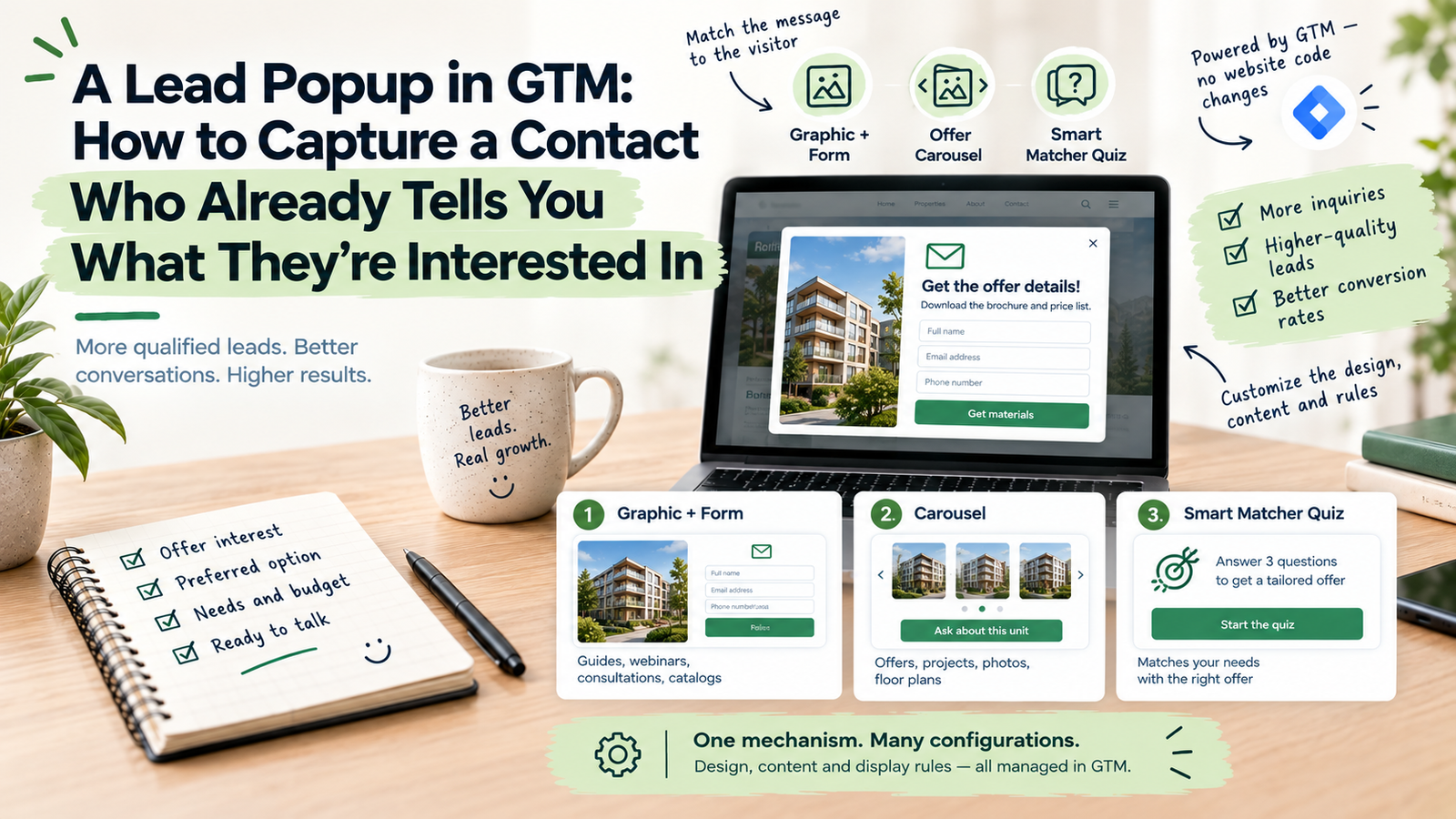
This solution was architected with real estate developers, residential investments, and B2B service firms in mind, but its underlying framework is universally adaptable. Instead of forcing all visitors into a single static contact form, it offers three distinct conversion touchpoints calibrated to the visitor's level of engagement and readiness to buy.
Three High-Converting Variants — Three Stages of the Buyer’s Journey
Variant 1: Visual Asset & Form (Direct Inquiries & Lead Magnets)
The cleanest and most direct layout. The modal features an elegant two-column composition: on one side sits an eye-catching graphic or visual rendering, and on the other, a frictionless form. In the real estate sector, this showcases an architectural exterior rendering with instant access to the downloadable brochure and current pricing. It performs equally well across a wide range of use cases:
- E-books / Guides / Checklists: high-resolution cover artwork with instant email delivery,
- Webinars & Training: speaker headshot with quick registration,
- Free Consultations & Audits: clear summary of deliverable value with scheduling request,
- B2B Product Catalogs & Price Lists: comprehensive spec sheet download upon company verification,
- Software Demos & Trials: frictionless sign-up for guided walkthroughs,
- Curated Newsletters: visual preview of past editorial insights.
The core philosophy is simple: clear visual value paired with a frictionless path to receive it.
Variant 2: Dynamic Interactive Carousel (Floor Plans / Value Propositions)
A versatile module whose content can be tailored to your primary commercial objectives. For real estate developers, this highlights architectural floor plans: as prospects browse through available layouts and spot a suitable unit, clicking “Inquire About This Unit” instantly opens the form with that specific unit pre-attached. The carousel can also present:
- Key Differentiators & USPs: bulleted advantages and compelling reasons to partner with your firm,
- Case Studies & Visual Portfolio: expandable galleries of completed projects or interior transformations,
- Modular Offer Cards: service tiers, package comparisons, or consultant profiles.
Every individual slide can trigger a pre-populated inquiry form or launch a secondary conversion goal.
Variant 3: Smart Matcher (Interactive 3-Step Qualifying Quiz)
A lightweight 3-step interactive quiz designed to match the ideal solution to the customer’s specific requirements. In property developments, it guides shoppers to their ideal apartment: users answer 3 concise questions regarding desired square footage, bedroom count, and budget parameters, instantly receiving a curated recommendation. In professional services and B2B, it recommends the optimal consulting tier.
This variant is specifically engineered for undecided prospects. Rather than forcing them to navigate through dozens of pages, you guide them effortlessly step by step while providing your sales team with rich qualifying criteria before the first call.
One Mechanism, Infinite Customization
The multi-variant lead popup is not a rigid template. Deployed via Google Tag Manager, it conforms seamlessly to your brand identity: color palette, typography, custom quiz questions, and direct integration with your CRM or marketing automation platform. You retain full control over which variant triggers on which landing pages and under what specific conditions.
Because it operates within your GTM container, marketing teams can deploy, A/B test, and adjust parameters within minutes without scheduling developer sprints.
Precision Behavioral Triggers (When & How Often?)
High-performing CRO must never alienate or frustrate visitors. The display timing and frequency are calibrated to your specific audience profile using intelligent behavioral rules:
- Exit-Intent Detection (Desktop): identifies cursor acceleration towards browser tabs or the close window button,
- Scroll Depth Thresholds: triggers only after the reader has engaged with at least 50% or 70% of page content,
- Engagement Timer: displays after a deliberate period of active browsing (e.g., 15–20 seconds),
- Frequency Capping: strictly capped (e.g., once per user session or once every 14 days) to prevent modal fatigue among recurring prospects.
Full Analytics Attribution (GA4 DataLayer & Ad Platforms)
Lead generation only delivers tangible business value if you can pinpoint exactly which campaign and which modal variant drove the highest return on investment (ROI). Every touchpoint dispatches structured events to the GTM DataLayer:
- Variant view events with granular campaign metadata,
- Slide interaction and carousel clicks,
- Step-by-step progress through the Smart Matcher quiz,
- Successful form submissions with full UTM parameters.
These structured events stream seamlessly into Google Analytics 4, Google Ads, Meta Ads, and your CRM for precise smart bidding optimization.
The Interconnected CRO Ecosystem
This lead generation popup is one modular component of a complete conversion infrastructure. In a mature GTM setup, mechanisms operate in synergy: for instance, visitors arriving from Google Ads see personalized hero headlines, with the lead popup triggering on high-intent pages. Meanwhile, blog readers might be guided by a reading progress bar that subtly offers a downloadable PDF checklist at the moment of peak interest. I’ll describe the other mechanisms in upcoming articles in this series, and you can test them immediately in the interactive demo on the project showcase page.
Summary: What Does This Implementation Deliver?
- Higher Lead Volume & Quality: three targeted interaction models catering to different stages of purchase readiness.
- Cross-Industry Versatility: equally effective for real estate, B2B services, consultation bookings, and lead magnets.
- Rapid 48-Hour Deployment via GTM: zero modifications to your core theme and zero developer backlog delays.
- Verifiable Revenue Attribution: comprehensive GA4 tracking and ad platform feedback loops.
- Modular Scalability: effortlessly connects with other on-page CRO modules without slowing down page load times.
Test All Three Variants Live
A description is no substitute for experiencing it firsthand. On the showcase page, I’ve prepared a fully functioning, interactive demo where you can test all three lead popup variants with live behavioral triggers:
Launch the Live Interactive Lead Popup Demo →About the Author: Jakub Ruciński
Deploying enterprise-grade GA4 pipelines, GTM DataLayers, and automated lead nurturing systems using Make.com and Positive User (formerly User.com).
Consult Your Architecture